Oct 1, 2026
How to automatically detect accruals and prepayments from Xero
Introducing.... our new Sync Xero Bills feature


I had a client say to me recently: "There seems to be lots of software which deals with prepayments but not really any for accruals. I'm sure someone will come up with something really clever soon."
It's us! We came up with something really clever, and it handles both.
And we've just made it even better.
How it works
- Bills are entered into Xero with the relevant dates the bill relates to in the description column. EasyAccrue now has two ways of detecting those dates - square brackets or AI detection. More on both below.
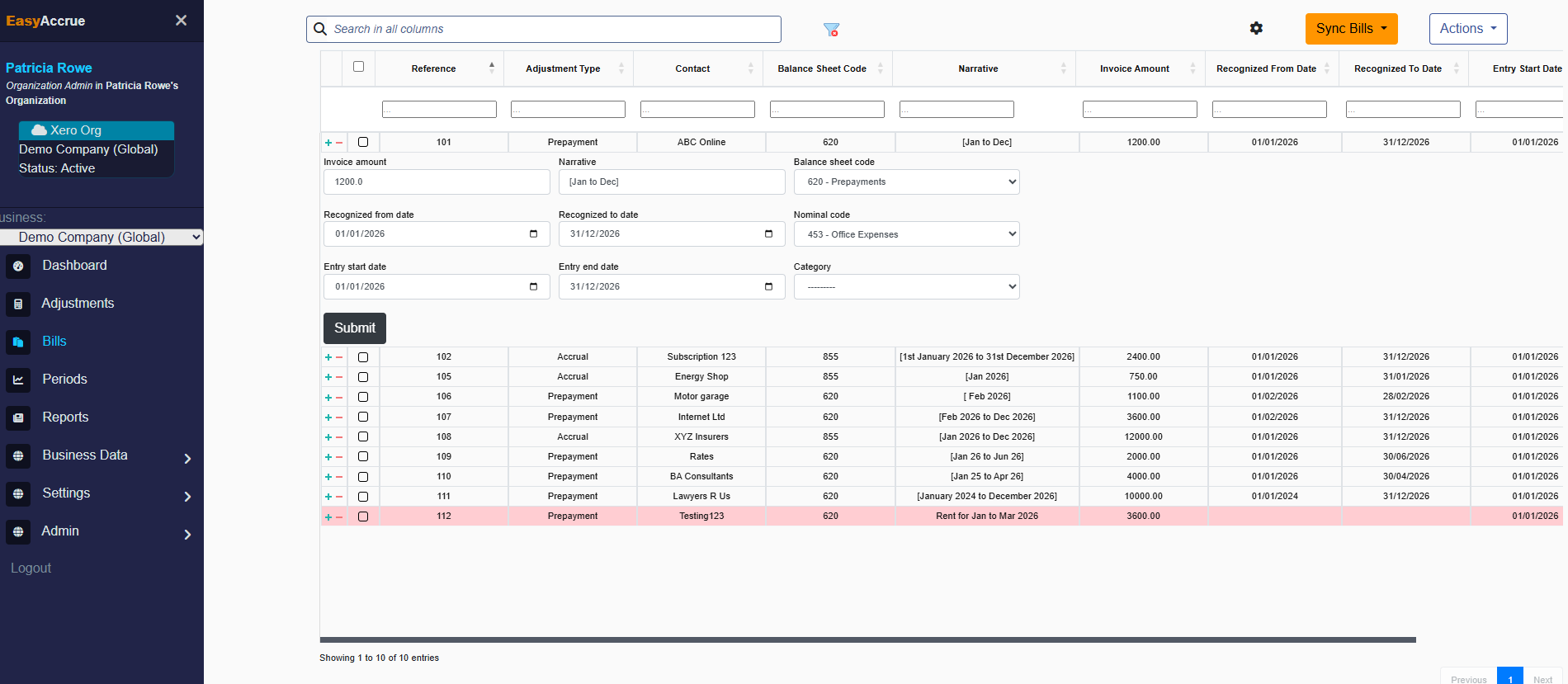
- The sync bills button in EasyAccrue brings in all bills under user specified codes which may be relevant for accruals and prepayments.
- Users make any required changes and approve the bills to automatically create accruals and prepayments.
- Users click post to Xero in the period they are working on.
Two ways EasyAccrue detects dates
Option 1 — Square brackets (most reliable)
You can still use square brackets to tell EasyAccrue exactly which period a bill relates to. This is the most reliable method and gives EasyAccrue certainty about the dates.
The square bracket format has been updated. You must now use the following format
- [Jan 2026 to Dec 2026] - abbreviated month with four digit year
To ensure your calculations are always accurate, please use a four digit year in all square bracket date formats.
If there are no dates in square brackets, EasyAccrue will attempt to detect the dates automatically using AI.
Option 2 — AI date detection (new)
EasyAccrue now uses AI to detect from and to dates from your bill descriptions automatically — even without square brackets.
This works well when your bill description includes month names in a recognisable format. For example:
- "Office rent January 2026 to March 2026" ✅
- "Annual insurance Jan 2026 to Dec 2026" ✅
- "Cleaning contract from February 2026 to July 2026" ✅
- "Software licence Feb 2026 - Jan 2027" ✅
AI detection doesn't work as well when dates are written in numeric formats such as 01/02/2026. This is because numeric date formats are ambiguous. Is 01/02/2026 the 1st of February or the 2nd of January? Depending on where your supplier is based, it could be either. AI cannot reliably resolve that ambiguity. There is also an issue with using 2 digit year formats. For example, February 26 can be read as 26th February instead of February 2026.
Our recommendation: If your suppliers use numeric date formats, ask them to include the month name in full or abbreviated form instead - for example "January 2026" rather than "01/2026." This small change makes a significant difference to how reliably EasyAccrue can detect the period automatically.
If EasyAccrue cannot detect the dates from the description, the bill will still be synced but you will need to input the dates manually in EasyAccrue.
Top tips
- EasyAccrue picks up months, not the full date. For example [Jan 2026 to Dec 2026] spreads over 12 months. Writing [15th Jan 2026 to 14th Jan 2027] would spread over 13 months from January 2026 to January 2027 - most likely not what you intended.
- EasyAccrue checks the current month for possible prepayments and future months for possible accruals.
- EasyAccrue does not sync bills that do not require accruals or prepayments. For example a bill relating to January, posted in January, with be excluded.
- If you have existing bills in Xero, edit the description to include the relevant period before syncing.
- If you use Hubdoc, Dext or other software that doesn't allow you to include dates in descriptions, you can either edit descriptions individually in draft bills, or export as a CSV, edit and re-import.
How EasyAccrue decides what to do with each bill
When EasyAccrue reads the dates in your bill descriptions, it compares the bill date to the recognition period to work out whether an accrual, prepayment, or no adjustment is needed. The table below shows the six most common scenarios. For these examples, assume you are working in the January 2026 period.
Frequently asked questions
1. Why are square brackets still the most reliable method?
AI date detection is powerful but not infallible. Square brackets tell EasyAccrue exactly what period to use with complete certainty. If your process allows it, square brackets remain our recommended approach. AI detection is ideal for bills where you have no control over the description format.
2. Which bills are brought into EasyAccrue?
Any bills posted to user specified nominal codes or directly into prepayment codes are brought in, unless the dates show that no accrual or prepayment is necessary. For example a bill relating entirely to the current month will not be brought in.
3. What if I post prepaid invoices directly to prepayments?
Any bills posted directly to prepayments will be synced into EasyAccrue. You will need to indicate the nominal code to post the prepayment to.
4. Is there a link to the Xero bill from EasyAccrue?
Yes. You can find the link to the original Xero bill in the bills screen by clicking on the supplier name. You will also see a link to the Xero invoice when you view the adjustment by clicking on the 'Xero Invoice' button.
5. What about accruals I don't yet have a bill for?
Non-invoice accruals can be inputted into EasyAccrue individually or uploaded in bulk as a CSV file.
6. How do I reconcile my accruals and prepayments accounts in Xero with EasyAccrue?
EasyAccrue has a user configurable monthly report showing your current list of accruals and prepayments, and a reconciliation report showing the opening balance and detailed movement for each individual item. This makes reconciling EasyAccrue and Xero very straightforward.
7. What if I use Hubdoc, Dext or other software?
If your document management software doesn't allow you to include dates in the description, you can either edit descriptions individually in draft bills or export as a CSV, edit and re-import.